Sweep theMoonWIKI

Sweep The Moon Tools: Prices, Upgrades and What to Buy

Last updated:

Choose a hand tool that fits your Cash budget and the dust you need to clear. Compare purchase requirements, upgrade costs, and the cooldown and capacity limits that affect vacuum use.
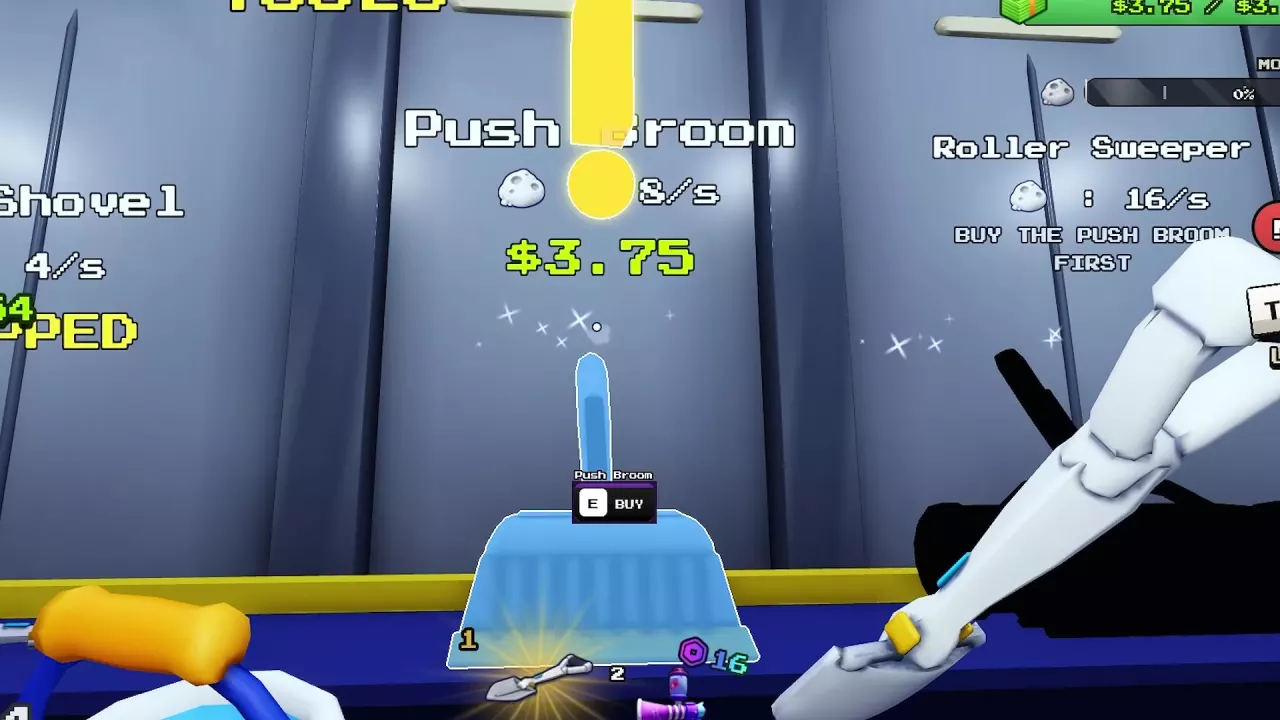
Push Broom's E BUY prompt beside Roller Sweeper's requirement to buy Push Broom first.

Quick answer

Hand Brush is the cheapest early improvement at 0.01 Cash. Choose Lunar Shovel for layered dust, or buy Push Broom to unlock Roller Sweeper for wider manual clearing. Turbo Vac costs 800 Cash and needs cooldown management. Galaxy Vacuum offers broad coverage with Robux purchase options; its 72 Robux offer lasts for the current run. Carrying capacity is separate from your tool.

Directory

7 objects

Hand tools, purchase options, cleaning behavior and upgrades.

Toothbrush

Price
—
How to get
Starting tool
Listed cleaning rate
1 dust/s (Shop listing)
Use
Click moon dust to clean it.
Purchase duration
—
Cooldown
—
Type
Starter hand tool
More details
Cleans
Moon Dust

Hand Brush

Price
0.01 Cash
How to get
Purchase with E in the base's TOOLS area; equips after purchase.
Listed cleaning rate
3 dust/s (Shop listing)
Use
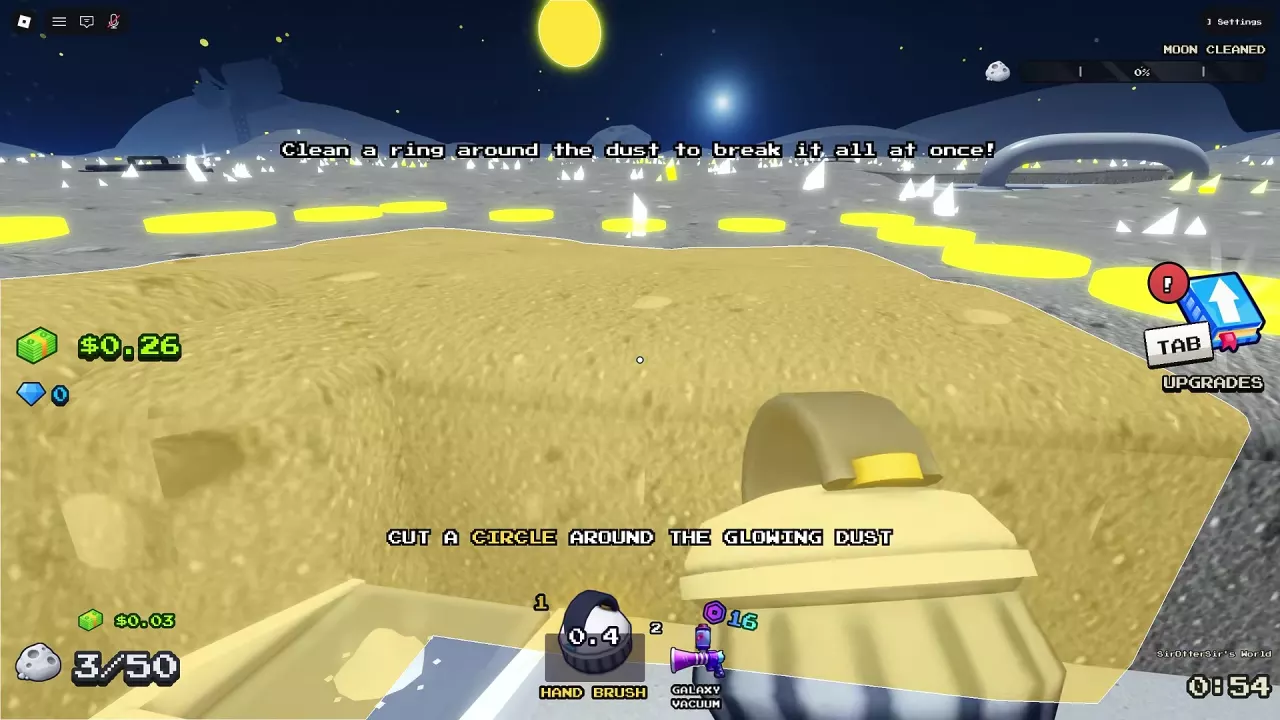
Clean moon dust with the equipped brush. It can clear a closed path around a dust island.
Purchase duration
—
Cooldown
—
Type
Hand brush
More details
Cleans
Moon Dust

Lunar Shovel

Price
2 Cash
How to get
Purchase with E at the tool shelf.
Listed cleaning rate
4 dust/s (Shop listing)
Use
Dig through multiple layers of moon dust per stroke.
Purchase duration
—
Cooldown
—
Type
Multi-layer shovel
More details
Stroke interval
0.75 seconds (Purchase configuration; before the 0.75-to-0.6-second upgrade)
Stroke interval
0.6 seconds (After the 0.75-to-0.6-second Stroke Speed upgrade)
Stroke Speed upgrade cost
0.5 Cash (Stroke interval: 0.75 to 0.6 seconds)
Sweep Width
3 tiles/stroke (Purchase configuration; before the 3-to-4-tile upgrade)
Sweep Width
4 tiles/stroke (After the 3-to-4-tile Sweep Width upgrade)
Sweep Width upgrade cost
2 Cash (Sweep Width: 3 to 4 tiles per stroke)
Power
3 layers/stroke (Purchase configuration; before the 3-to-4-layer upgrade)
Power
4 layers/stroke (After the 3-to-4-layer Power upgrade)
Power upgrade cost
2 Cash (Power: 3 to 4 layers per stroke)
Cleans
Moon Dust

Push Broom

Price
3.75 Cash
How to get
Purchase with E at the tool shelf; equips after purchase.
Listed cleaning rate
8 dust/s (Shop listing)
Use
—
Purchase duration
—
Cooldown
—
Type
Hand broom
More details
Tutorial role
Buying Push Broom completes the Quest 3/8 purchase objective and advances to Quest 4/8, Buy Junk Hauler. (Eight-quest tutorial)
Cleans
Moon Dust
Unlocks the purchase of
Roller Sweeper (After purchasing Push Broom)

Roller Sweeper

Price
15 Cash (After purchasing Push Broom)
How to get
Buy Push Broom first, then purchase Roller Sweeper at the tool shelf. It equips after purchase.
Listed cleaning rate
16 dust/s (Shop listing)
Use
—
Purchase duration
—
Cooldown
—
Type
Hand sweeper
More details
Stroke interval
0.5 seconds (Before the 0.5-to-0.4-second Stroke Speed upgrade)
Stroke interval
0.4 seconds (After the 0.5-to-0.4-second Stroke Speed upgrade)
Stroke Speed upgrade cost
7.5 Cash (Stroke interval: 0.5 to 0.4 seconds)
Sweep Width
8 tiles/stroke (Before the 8-to-10-tile Sweep Width upgrade)
Sweep Width
10 tiles/stroke (After the 8-to-10-tile Sweep Width upgrade)
Sweep Width upgrade cost
11 Cash (Sweep Width: 8 to 10 tiles per stroke)
Power
3 layers/stroke (Before the 3-to-4-layer Power upgrade)
Power
4 layers/stroke (After the 3-to-4-layer Power upgrade)
Power upgrade cost
30 Cash (Power: 3 to 4 layers per stroke)
Requires prior purchase of
Push Broom
Cleans
Moon Dust

Turbo Vac

TURBO VAC

Price
800 Cash
How to get
Purchase with E at its tool display.
Listed cleaning rate
40 dust/s (Shop listing)
Use
—
Purchase duration
—
Cooldown
Use is interrupted by cooldown downtime.
Type
Hand vacuum
More details
Sweep Width
11 tiles/stroke (Before the 11-to-14-tile Sweep Width upgrade)
Sweep Width
14 tiles/stroke (After the 11-to-14-tile Sweep Width upgrade)
Sweep Width upgrade cost
19 Cash (Sweep Width: 11 to 14 tiles per stroke)
Sweep Width
18 tiles/stroke (Maximum Sweep Width configuration)
Power
3 layers/stroke (Before the 3-to-4-layer Power upgrade)
Power
4 layers/stroke (After the 3-to-4-layer Power upgrade)
Power upgrade cost
3.75 Cash (Power: 3 to 4 layers per stroke)
Power
14 layers/stroke (Maximum Power configuration)
Overheat downtime
10 seconds (Before the 10-to-7-second Overheat Time upgrade)
Overheat downtime
7 seconds (After the 10-to-7-second Overheat Time upgrade)
Overheat Time upgrade cost
3.75 Cash (Overheat downtime: 10 to 7 seconds)
Overheat downtime
2 seconds (Before the 2-to-1-second Overheat Time upgrade; Sweep Width and Power can already be maxed)
Overheat downtime
1 seconds (After the 2-to-1-second Overheat Time upgrade)
Overheat Time upgrade cost
30 Cash (Overheat downtime: 2 to 1 second)
Cleans
Moon Dust

Galaxy Vacuum

GALAXY VACUUM

Price
72 Robux (This-run purchase option)
16 Robux (Purchase option labeled Galaxy Vacuum [2M])
How to get
Complete a Galaxy Vacuum Robux purchase option.
Listed cleaning rate
—
Use
—
Purchase duration
Current run (72 Robux this-run purchase option)
Cooldown
Has cooldown downtime. (This-run vacuum use)
Type
Paid hand vacuum
More details
Purchase option
Galaxy Vacuum [2M] (16 Robux purchase dialog)
Cleaning coverage
Broad area (This-run vacuum use)
Carrying capacity
Uses separate carrying-capacity equipment. Infinite Capacity must be equipped separately to activate unlimited capacity. (Using the separate Infinite Capacity equipment)
Cleans
Moon Dust
Can be used with
Infinite Capacity (Equip Infinite Capacity separately to activate unlimited carrying capacity)

Tool Prices, Uses and Purchase Requirements

The shop's cleaning rates are listed in dust per second. Use them to compare the listings, while also considering the tool's upgrades, cooldown pauses and time spent emptying your container.

Cash purchases and Robux offers use different currencies. Galaxy Vacuum's 72 Robux current-run offer and 16 Robux offer labeled Galaxy Vacuum [2M] are separate purchase options.

  • Toothbrush

    Type
    Starter hand tool
    How to get
    Starting tool
    Listed cleaning rate
    1 dust/s (Shop listing)
    Use
    Click moon dust to clean it.
  • Hand Brush

    Price
    0.01 Cash
    How to get
    Purchase with E in the base's TOOLS area; equips after purchase.
    Listed cleaning rate
    3 dust/s (Shop listing)
    Use
    Clean moon dust with the equipped brush. It can clear a closed path around a dust island.
  • Lunar Shovel

    Price
    2 Cash
    How to get
    Purchase with E at the tool shelf.
    Listed cleaning rate
    4 dust/s (Shop listing)
    Use
    Dig through multiple layers of moon dust per stroke.
  • Push Broom

    Price
    3.75 Cash
    How to get
    Purchase with E at the tool shelf; equips after purchase.
    Listed cleaning rate
    8 dust/s (Shop listing)
    Tutorial role
    Buying Push Broom completes the Quest 3/8 purchase objective and advances to Quest 4/8, Buy Junk Hauler. (Eight-quest tutorial)
  • Roller Sweeper

    Price
    15 Cash (After purchasing Push Broom)
    How to get
    Buy Push Broom first, then purchase Roller Sweeper at the tool shelf. It equips after purchase.
    Listed cleaning rate
    16 dust/s (Shop listing)
  • Turbo Vac

    Price
    800 Cash
    How to get
    Purchase with E at its tool display.
    Listed cleaning rate
    40 dust/s (Shop listing)
    Cooldown
    Use is interrupted by cooldown downtime.
  • Galaxy Vacuum

    Price
    72 Robux (This-run purchase option)
    16 Robux (Purchase option labeled Galaxy Vacuum [2M])
    Purchase option
    Galaxy Vacuum [2M] (16 Robux purchase dialog)
    Purchase duration
    Current run (72 Robux this-run purchase option)
    How to get
    Complete a Galaxy Vacuum Robux purchase option.
    Cleaning coverage
    Broad area (This-run vacuum use)
    Cooldown
    Has cooldown downtime. (This-run vacuum use)
    Carrying capacity
    Uses separate carrying-capacity equipment. Infinite Capacity must be equipped separately to activate unlimited capacity. (Using the separate Infinite Capacity equipment)

Which Tool Should You Buy?

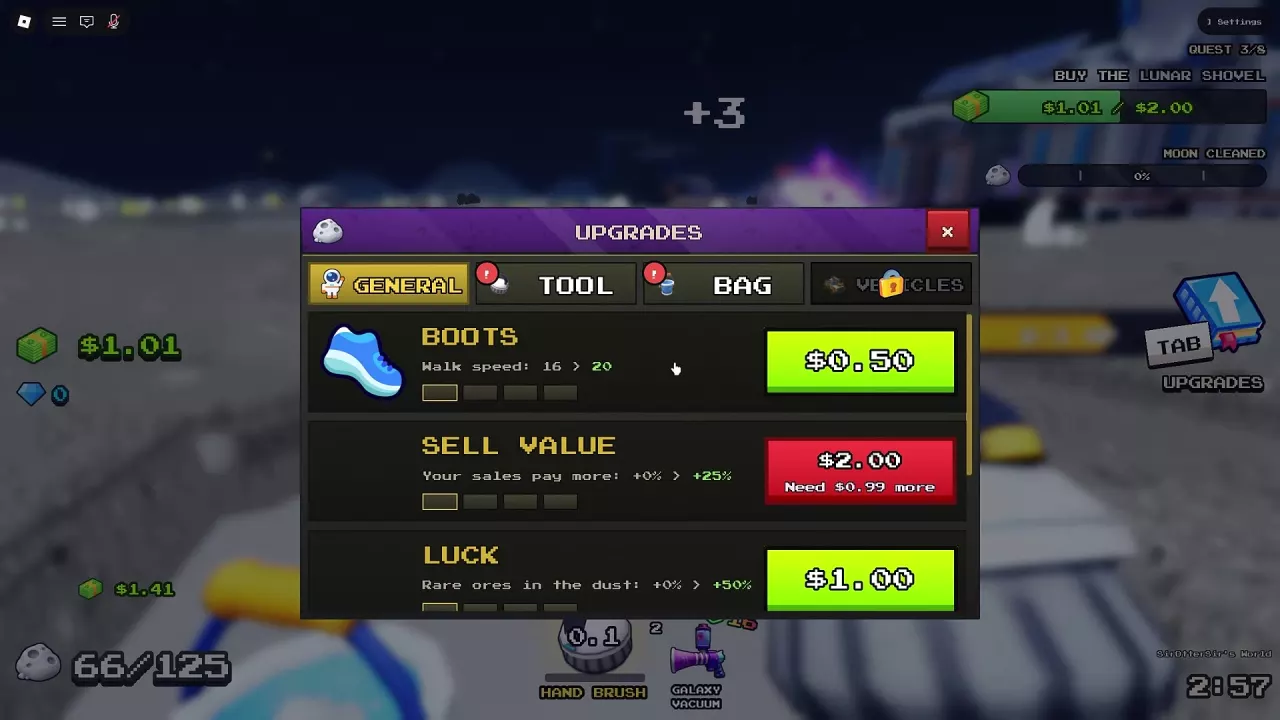
  • Toothbrush — start collecting immediately. It begins in hotbar slot 1. Equip it and click moon dust to earn your first Cash.
  • Hand Brush — the best first purchase on a tiny budget. At 0.01 Cash, it raises the shop-listed rate from Toothbrush's 1 dust/s to 3 dust/s for very little spending.
  • Lunar Shovel — choose it for layered dust. The 2 Cash purchase configuration clears 3 tiles and 3 layers per stroke, with a 0.75-second stroke interval. Its multi-layer digging makes it useful when repeated passes over thick dust are slowing you down.
  • Push Broom — choose it to advance purchases and tutorial progress. It costs 3.75 Cash and unlocks Roller Sweeper. In the eight-quest tutorial, buying it also completes the Quest 3/8 purchase objective and advances to Buy Junk Hauler.
  • Roller Sweeper — choose it to widen manual clearing. After buying Push Broom, spend 15 Cash on Roller Sweeper. Its width upgrades support broader passes, and its shop-listed rate is 16 dust/s compared with Push Broom's 8 dust/s.
  • Turbo Vac — a Cash upgrade for players willing to manage cooldown. Its 800 Cash price buys a tool listed at 40 dust/s. Budget for upgrades that improve coverage, layer removal or recovery, according to what interrupts you most.
  • Galaxy Vacuum — choose it for broad coverage if you accept Robux spending. The current-run option suits a push to clear a large area during that run, but the vacuum still pauses for cooldown.

Tool choice also works alongside your clearing technique. A closed path around a dust island can clear the enclosed dust; follow the island-breaking guide for the route and steps.

Buy and Equip Tools at the Base

  1. Enter the base's TOOLS area and approach the tool's display.
  2. Use the E purchase prompt and complete the purchase with the required currency.
  3. For Roller Sweeper, buy Push Broom first, then purchase Roller Sweeper.
  4. Hand Brush, Push Broom and Roller Sweeper equip after purchase. Use the equipped tool on moon dust.
Push Broom's E BUY prompt beside Roller Sweeper's requirement to buy Push Broom first.

Choose Stroke Speed, Sweep Width or Power

Press Tab → UPGRADES → TOOL. Compare the current value, next value and Cash price, then buy the upgrade that addresses your main clearing bottleneck.

  • Stroke Speed: reduces the time between strokes. Choose it when waiting between swings slows your progress; a lower interval is faster.
  • Sweep Width: increases tiles cleared per stroke. Choose it when you need more coverage across a broad patch.
  • Power: increases layers cleared per stroke. Choose it when thick dust requires repeated passes over the same tiles.

Lunar Shovel upgrades

Attribute Current → upgraded value Cost
Stroke Speed 0.75 → 0.6 seconds between strokes 0.50 Cash
Sweep Width 3 → 4 tiles/stroke 2 Cash
Power 3 → 4 layers/stroke 2 Cash

Roller Sweeper upgrades

Attribute Current → upgraded value Cost
Stroke Speed 0.5 → 0.4 seconds between strokes 7.50 Cash
Sweep Width 8 → 10 tiles/stroke 11 Cash
Power 3 → 4 layers/stroke 30 Cash

Turbo Vac coverage and Power upgrades

Attribute Current → upgraded value Cost
Sweep Width 11 → 14 tiles/stroke 19 Cash
Power 3 → 4 layers/stroke 3.75 Cash
Attribute MAX value
Sweep Width 18 tiles/stroke
Power 14 layers/stroke

Each price applies to the exact attribute transition shown. Turbo Vac's Overheat Time upgrades address a separate bottleneck, covered below. For movement, Luck and Sell Value choices, use the general upgrades guide.
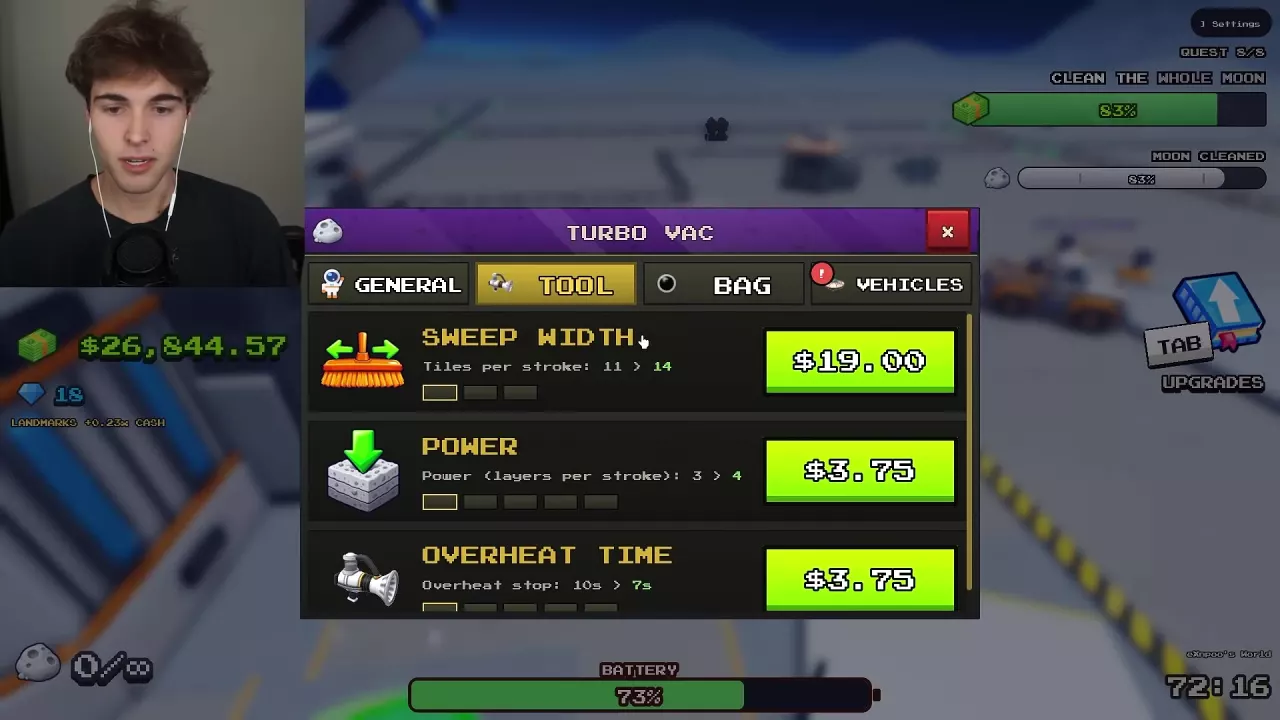
Turbo Vac's TOOL menu with Sweep Width, Power and Overheat Time upgrade prices.

Manage Turbo Vac and Galaxy Vacuum Cooldowns

Both vacuums have cooldown downtime. On Turbo Vac, Overheat Time means how long the tool stops, so reducing that value shortens the interruption.

Turbo Vac Overheat Time upgrade Cost
10 → 7 seconds of downtime 3.75 Cash
2 → 1 second of downtime 30 Cash

Sweep Width and Power can already show MAX while an Overheat Time upgrade remains available. If recovery pauses are your main delay, spend on Overheat Time instead of looking for more width or Power.

If you own both Turbo Vac and Galaxy Vacuum, switch to the other vacuum while one recovers. This gives you another tool to use during a pause, though cooldown can still interrupt cleaning.

A full container needs a different response: empty the dust at a SELL pad. Waiting for the vacuum to cool down does not free carrying space.
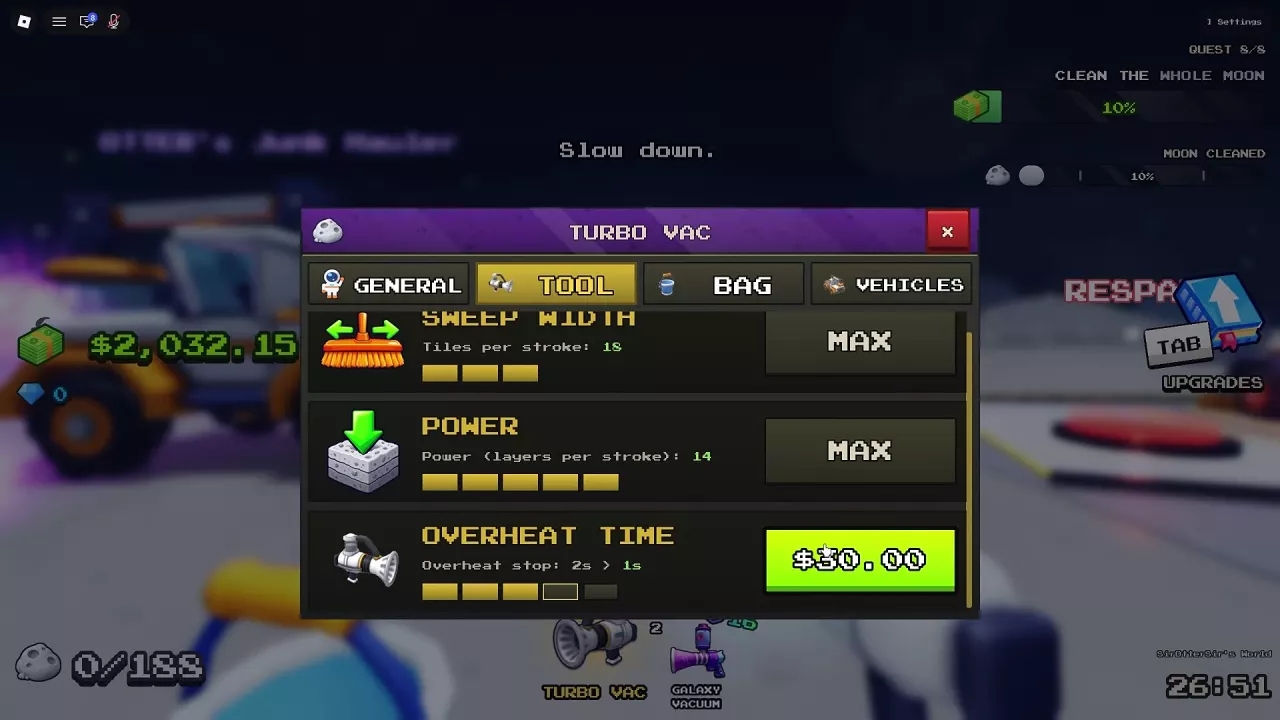
Turbo Vac with maximum width and Power, plus a 30 Cash upgrade reducing overheat downtime from 2 seconds to 1.

Galaxy Vacuum Purchase Duration and Carrying Capacity

The 72 Robux Galaxy Vacuum offer applies to the current run. The separate purchase option labeled Galaxy Vacuum [2M] lists 16 Robux. Choose the intended offer before completing the Robux purchase.

Buying Galaxy Vacuum does not activate unlimited storage. Your carrying limit comes from separate capacity equipment. If you also buy Infinite Capacity, go to its glowing orb at the base and equip it; the capacity limit changes to ∞ when active. The orb then offers E — UNEQUIP, which removes it.

For larger regular containers, Bag upgrades and capacity setup, see canisters and carrying capacity.

For capacity that lasts across moons, Infinite Canister is a separate permanent pass. It still requires emptying the canister at the intake to receive Cash. Compare its benefits with other game passes before choosing a permanent purchase.

Infinite Capacity equipped at the glowing orb, with an infinity capacity display and E UNEQUIP prompt.